Alerts & Notificaties MT4
MetaTrader 4
Section titled “MetaTrader 4”Notificaties inschakelen op MT4 terminal
Section titled “Notificaties inschakelen op MT4 terminal”Volg deze stappen om notificaties in te schakelen in MT4:
- Open MT4: Start het MetaTrader 4 platform
- Inloggen: Log in op uw handelsaccount als u dat nog niet heeft gedaan
- Ga naar Options: Klik op het “Tools” menu > “Options”
- Notificatie-instellingen: Navigeer naar het “Notifications” tabblad
- Notificaties inschakelen: Vink “Enable Push Notifications” aan
- MetaQuotes ID invoeren: Voer uw ID in vanuit de instellingen van de MT4 mobiele app
- Notificatie testen: Klik op “Test” om de instelling te verifieren
- Instellingen opslaan: Klik op “OK” om de wijzigingen op te slaan
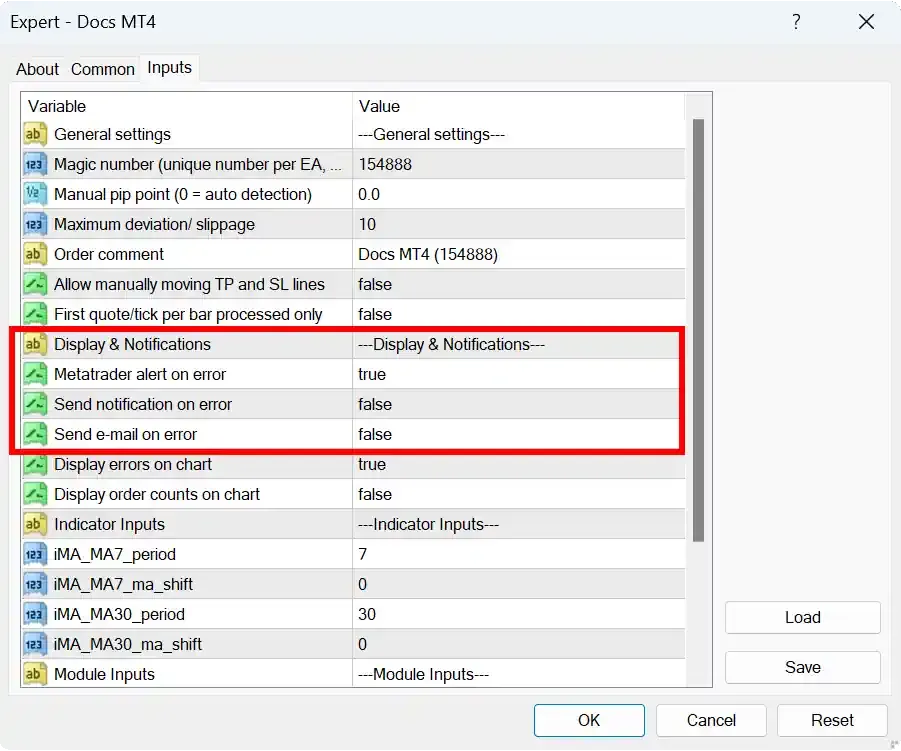
Notificaties inschakelen in MT4 EA
Section titled “Notificaties inschakelen in MT4 EA”Open de eigenschappen van uw EA en ga naar het “Inputs” tabblad om alerts te configureren:
- Stel alert/notificatie/e-mail-instellingen in op “true” zoals gewenst
- Configureer eventuele aanvullende alert-parameters