警报与通知 MT5
MetaTrader 5
Section titled “MetaTrader 5”在 MT5 终端启用通知
Section titled “在 MT5 终端启用通知”按照以下步骤在 MT5 中启用通知:
- 启动 MT5:启动 MetaTrader 5
- 登录:登录您的交易账户
- 进入设置:点击
Tools菜单 >Options - 通知选项卡:进入
Notifications选项卡 - 启用推送通知:勾选
Enable Push Notifications - MetaQuotes ID:输入您在 MT5 移动应用设置中的 ID
- 测试通知:点击
Test验证设置 - 保存更改:点击
OK保存
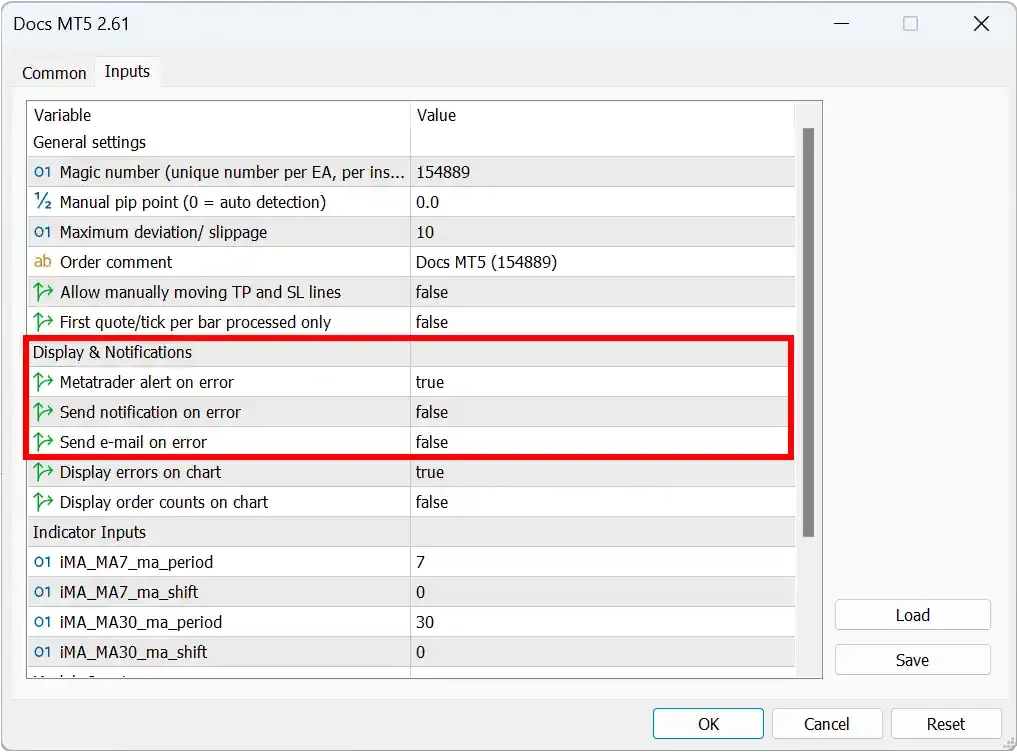
在 MT5 EA 中启用通知
Section titled “在 MT5 EA 中启用通知”打开您的 EA 属性,进入 Inputs 选项卡配置警报:
- 根据需要将警报/通知/邮件设置为
true - 配置任何其他警报参数
重要提示:即使启用了警报和通知,也不要让您的账户处于无人看管状态,因为这些功能可能会失败。
对于 MT4 和 MT5 中的交易通知:
- 进入 Tools > Options > Notifications
- MT4:启用
Notify of trade transactions - MT5:同时启用
Notifications from the local terminal和Notifications from the trade server
注意:您的移动设备必须安装 MetaTrader 移动应用并启用通知,才能接收推送通知。